
What Is a Stage Timer?
A stage timer is a visible timing display that helps speakers and event teams manage the time allocated to a presentation, discussion or performance. It commonly shows a countdown so the person on stage can see how much time remains.
You might use one for a conference keynote, church service, training session or panel discussion. Instead of checking a watch or waiting for a verbal interruption, the presenter can glance at the display and adjust their pace.
This guide explains how stage timers work, what equipment a basic setup needs and how you can get started with <a href="https://mystageclock.com/app/">MyStageClock</a>.
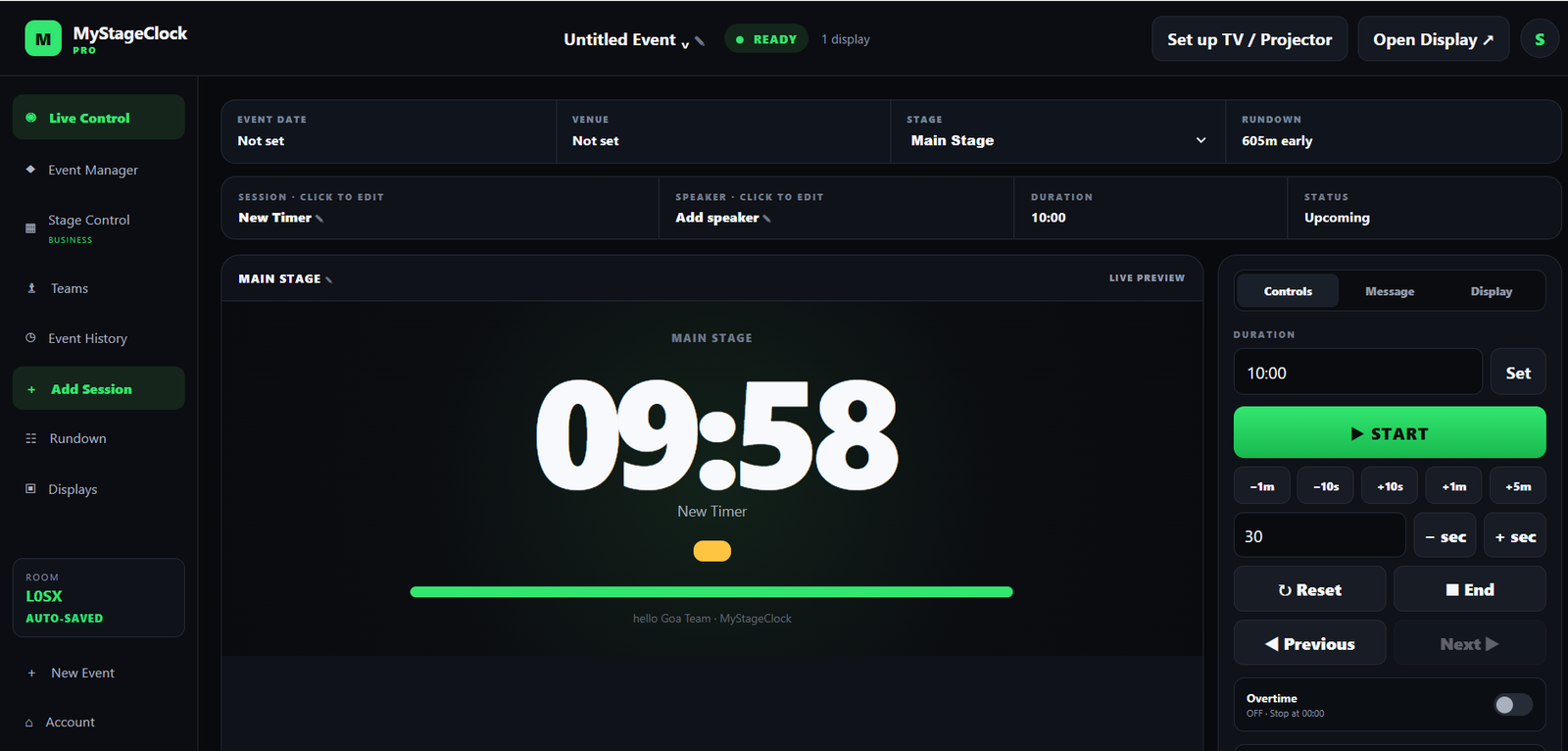
How does a stage timer work?
A typical stage timer setup has two parts: controls for the operator and a display for the speaker.
The operator selects the session, sets its duration and starts the countdown at the agreed moment. The speaker sees the remaining time on a screen positioned within their line of sight.
These two views serve different purposes. The operator needs buttons and session details, while the presenter needs a clear display that can be understood at a glance.
For example, an operator might start a 20-minute countdown when a keynote speaker begins. At five minutes remaining, the speaker knows it is time to finish the main points and move towards the conclusion.
Some timer systems also provide messages, warning colours or additional display options. The available functions depend on the software and setup being used.
Why use a stage timer at an event?
When several speakers share an agenda, one overrun can affect everyone who follows. A visible countdown gives presenters a common reference for the time they have left.
It can also reduce the need for interruptions. Rather than repeatedly signalling from the back of the room, the event team can agree on a timing system before the session begins.
For presenters, the countdown supports decisions during delivery. If a section takes longer than expected, they can shorten an example or leave extra detail for questions.
A timer does not guarantee that an event will finish on schedule. The agenda still needs realistic durations, and the moderator needs an agreed approach to overruns. The timer makes those time limits easier to see.
Where are stage timers used?
Conferences and seminars: Speakers can monitor their presentation time while moderators manage introductions, questions and handovers.
Church services: The team can plan time for speaking segments, announcements and other parts of the service.
Panel discussions: A timer can support opening statements, timed responses and the final question period.
Training sessions and workshops: Facilitators can allocate time to explanations, group activities and feedback.
Rehearsals: Presenters can practise against their actual time allowance before appearing in front of an audience.
The best setup depends on who needs to see the time. A speaker-facing monitor may suit a conference, while a shared display may be more useful for a group activity.
Stage timer, countdown timer or stopwatch?
| Tool | What it shows | Example use |
|---|---|---|
| Countdown timer | Time remaining until a chosen duration ends | Giving a presenter 20 minutes to speak |
| Stopwatch | Time elapsed since it was started | Measuring the length of a rehearsal |
| Stage timer | A timing display arranged for speakers and event teams; often uses a countdown | Showing remaining presentation time on a speaker-facing monitor |
What equipment do you need?
For a basic setup, you need a device to control the timer and a display that the speaker can read.
A laptop can serve as the controller. The display might be an external monitor, TV or projector connected to that laptop. A separate device can also show a browser-based display when the software supports that workflow.
If you are connecting a screen by cable, check the laptop’s video output and the screen’s input. You may need an HDMI cable or a suitable adapter.
For MyStageClock, include internet access in your preparation and test the actual devices you intend to use. Do not assume a venue connection or screen configuration will work without a rehearsal.
Read our TV and projector setup guide for connection options and display preparation.
Place the display where the speaker can read it
Test visibility from the speaker’s actual position, including anywhere they are likely to move during the presentation.
A countdown behind the presenter may be difficult to check without turning away from the audience. A speaker-facing screen near the front of the stage can be more practical.
Check the viewing angle, text size, lighting and possible obstructions. A timer that looks clear at the control desk may be difficult to read from the lectern.
A simple conference timing example
Imagine a conference session with a 30-minute allowance. The organizer assigns 20 minutes to the presentation, eight minutes to questions and two minutes to the handover.
The presenter sees a countdown for their speaking time. When the presentation ends, the moderator begins the question period. The event team then uses the final handover allowance to prepare for the next session.
This approach makes each part of the session explicit. Giving the presenter the entire 30 minutes without explaining the question and handover allowance could leave the agenda short of time.
You can use our Conference Agenda Calculator to explore how session durations affect an event’s finishing time.
Frequently asked questions about stage timers
Is a stage timer the same as a countdown timer?
A countdown describes a timing mode that shows time remaining. A stage timer describes a setup intended for speakers and event teams, often with a separate controller and a clear display.
Can I use a TV as a stage timer display?
Yes, a TV can act as an external display when connected to a suitable device. Check the connection, display settings and readability before the event.
Does the audience need to see the stage timer?
No. A timer can face only the speaker. Whether the audience sees it depends on the event and where you position the display.
Who should control the stage timer?
A designated operator or moderator can control it. Agree who starts each session and what happens during interruptions.
Can a stage timer help with presentation practice?
Yes. Rehearsing with a countdown lets you compare your delivery with your time allowance and identify sections that need editing.
How do I get started with MyStageClock?
Open MyStageClock, prepare a timer and test the display before using it during an event.